Superagent, explained.
Install it, point it at something, and talk. Everything below is written for someone who has never opened a terminal — and stays true for someone who lives in one.
What Superagent is
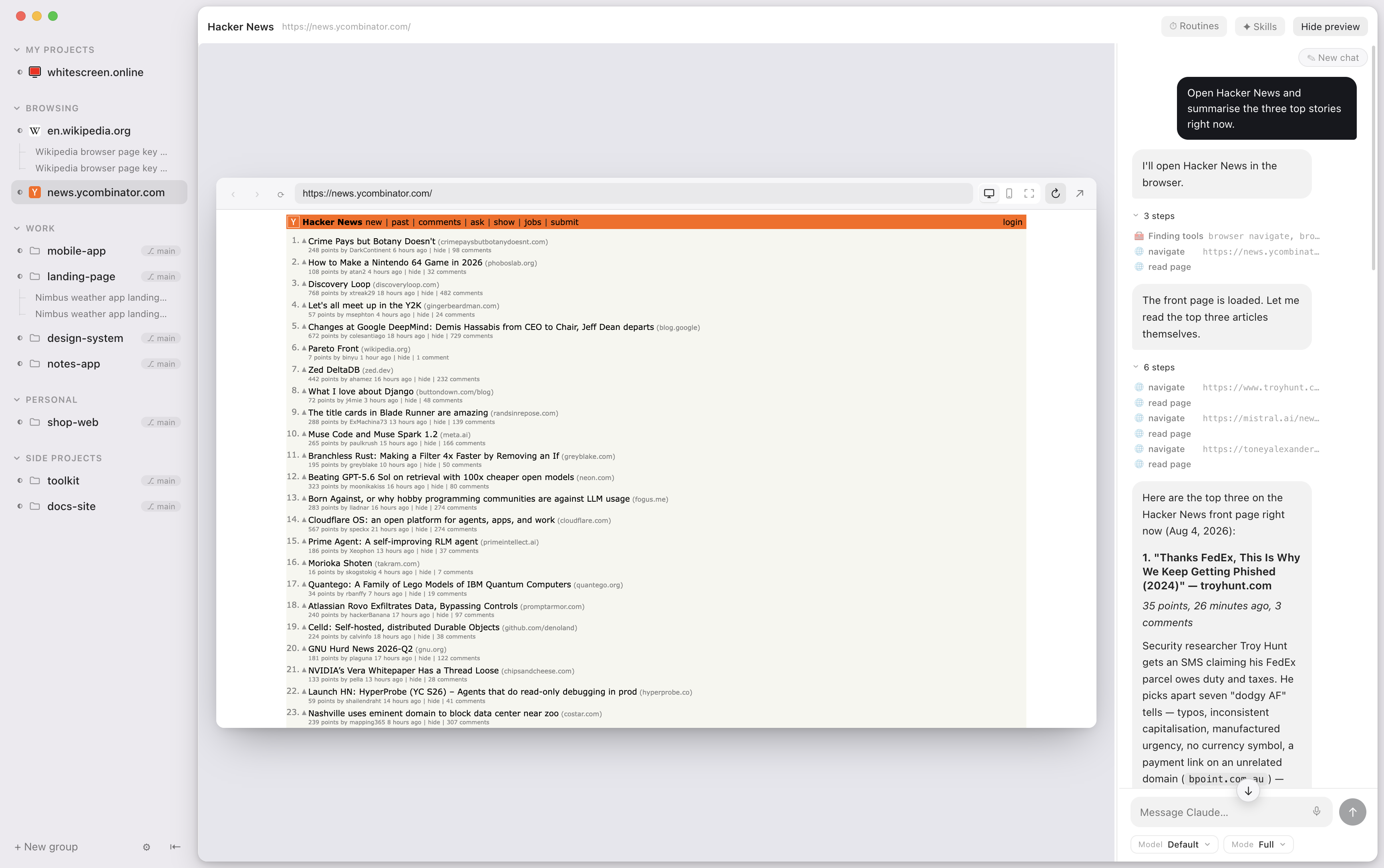
Superagent is a Mac app that gives a coding agent a place to work — and gives you a place to watch. Every project is a chat sitting next to the thing being built: a real browser on the sites you're already logged into, the files it's editing, and an iOS Simulator streamed straight into the window.
It is not an AI of its own. It runs Claude Code, on the Claude subscription you already pay for, entirely on your Mac. There is no Superagent server, no account and no API key.
You describe a thing; it gets built on your machine, on your accounts; you watch it happen in the pane next door.
Who it's for
Superagent is designed for the person who doesn't write code first, and the person who does second. That order is deliberate, and it's the opposite of how most tools in this category are built.
It doesn't get there by hiding the code — the files, the diffs and the branches are all right there when you want them. It gets there by putting the thing being built on screen next to the chat, so you can judge it the way you judge anything else: by looking at it.
You'll get on with it if…
- You'd rather see the page than read the diff.
- You want the agent on your accounts — your dashboard, your admin panel, your half-finished site — not a clean sandbox that's logged into nothing.
- You want it on your own machine, on the subscription you already have.
- You're building something on your phone and want to watch it run on a real device.
You might want something else if…
- You want a fleet. If the job is fanning one prompt across a dozen agents and racing them, a parallel-worktree tool like Orca is built for exactly that, and it runs on Windows and Linux too.
- You have no Mac and no repo. A hosted builder like Lovable or Bolt will get you a new app tonight without installing anything.
- You want errands, not software. Booking, forms, research round-ups — that's a different kind of agent.
Install it
What you need
| A Mac | Apple Silicon (M1 or later). Intel Macs aren't supported. |
|---|---|
| Claude Code | Required. Installed and signed in. Your Claude subscription is the only thing Superagent runs on — nothing extra to buy, no key to paste. Get Claude Code. |
| Xcode | Optional. Only if you want the iPhone simulator in the window. |
| An iPhone | Optional. Only if you want the companion app in your pocket. |
The steps
- Install Claude Code and sign in. Open it once and make sure it answers you. Superagent drives it, so if it isn't working there, it won't work here.
- Download Superagent. the .dmg — signed and notarized by Apple, so it opens without arguing.
- Drag it to Applications and open it. macOS will ask once whether you're sure.
- Add a project. Point it at any folder on your disk — a git repo, a website, a pile of documents. It doesn't have to be code.
- Say what you want. That's the whole interface.
New versions arrive signed and notarized in the background, with a "What's new" for each release. Restart whenever it suits you.
Or run it from source
git clone https://github.com/pungme/superagent-desktop
cd superagent-desktop/app
npm install
npm run dev
Your first five minutes
The fastest way to understand the app is to give it something with a screen.
- Add the project you're working on, or make an empty folder and add that.
- Ask for something visible. "Build me a one-page site for a coffee shop and show it to me." It will write the files, start a dev server itself, and open the page in the browser pane beside the chat.
- Ask for a change. "Make the header dark." Watch the page update in the same window — no alt-tabbing to find out whether it worked.
- Press the two-views button in the browser toolbar to see the same page as a desktop card and an iPhone frame at once, both live.
- Keep it or throw it away. On a git project, two buttons appear at the top of the chat when it has made changes. That's the whole review step.
Hold ⌥ Space, speak, let go. Transcribed on your own Mac; your voice never leaves it. The model is fetched once, the first time you use it.
The sidebar
Everything the app is doing lives in one rail down the left.
- The Computer sits at the top, with its own conversations under it.
- Projects come next, in one section: open browser tabs first, then your projects, each with its conversations nested underneath and the git branch shown where you'd expect it. The globe on its header opens a new tab; the folder adds a project. Groups you make yourself sit below it.
- Pinned chats can be dragged into any order, and the phone follows it.
Each project shows its own icon: a website's favicon, or a native app's icon from its Xcode AppIcon, even inside a folder that holds several repos. ⌘ K shows the same icon next to projects and conversations.
A project that holds several repos folds them away with a caret on its own row, and remembers whether you left it open. A repo that is still cloning says so. When a simulator is attached, the project keeps its icon and a small phone appears at the right of the row.
The dots tell you where things stand: a spinner while the agent works, a dot when it needs you, and a green dot when a background job is running.

Many chats per project
Chats name themselves after whatever the conversation turned out to be about. Starting a new one never loses the old one, and each keeps its own place: panes, open files and scroll position all survive a restart — even through an update.
Chats & branches
On a git project, every conversation automatically gets a private copy of the project on its own branch. Two chats on the same repo can edit, branch and commit side by side without touching each other — or your own checkout.
You don't have to know what any of that means to use it. It shows up as two buttons.
| Keep | Adds everything the chat did to the project as one change, named after the chat. It lands on the branch the chat was started from, even if you've switched the project since. |
|---|---|
| Throw away | Deletes all of it. Deleting a chat that still has unkept work asks you first. |
The details, if you want them
- Branches are named after the conversation. "Fix the flaky auth test" becomes
fix-the-flaky-auth-test, and follows renames. - No re-installs. Dependency folders (
node_modules,.venv,vendor,target) are shared into each chat's copy rather than downloaded again. - It's a real git worktree. You can
cdinto it and use plain git any time you like.
Then there are no branches and no Keep button — the agent just works in the folder, like any other program.
The browser
The chat sits next to a real browser, and Claude can drive it: open a page, click, type, read it back. Not a hidden browser it describes to you second-hand — the one on your screen, with your logged-in session. You watch it work, and you can take over at any moment.
- Your logins are your logins. Browser sessions live in a profile on your Mac, the same as any browser. That's what makes it useful on your real dashboard.
- Automation stays in here. The agent only ever drives Superagent's own browser pane, never your personal Chrome or Safari.
- Dev servers. Point it at localhost, or ask it to start the server itself — it stays one click away in the toolbar.
- Its own tab. The agent keeps a tab of its own, so a tab you open to look something up isn't taken over by its next navigation.
- One page, seen twice. One click shows the page as a desktop card and an iPhone frame at the same time, same session, both live.
- A real phone size. The agent can switch the pane to a real 390×844 mobile viewport, to desktop, or to both side by side, to check a mobile layout instead of faking one.
The iPhone in the window
An iOS Simulator streamed inside the app from its own framebuffer — the real device, live at the rate it renders. Tap, swipe and type on it. So can the agent, which means it builds, launches and checks its own app without you playing courier.
- Nothing to install beyond Xcode: the input helper ships with Superagent.
- Apple's own Simulator window stays shut unless you ask for it, so you're never watching the wrong device.
- The pane reveals itself when the agent boots or launches something.
The simulator and the page you're on sit side by side on the same surface.
Files, @ and snips
- Click any file to read it — PDFs, images, markdown, source — right beside the tree. You can annotate PDFs in place, and drag files into the chat.
@reaches everything. Type@for this project's files, the other projects in your sidebar by name, or any folder on the disk (@/,@~/), drilling in one level at a time.- Snip to attach. The scissors on the browser or the simulator (or ⌘ ⇧ S): drag a box on the page or the phone screen and the crop lands in your message at full resolution.
- See every edit the moment it happens, with just the change highlighted.
What the agent is allowed to do
One picker in the composer decides how much rope it gets. It matches Claude Code's own modes, and you can change it mid-conversation.
| Mode | What it does |
|---|---|
| Full | Runs commands and edits files, like your terminal. The default. |
| Ask | Asks before commands and edits — approve on the Mac, or on your phone if that's where you are. |
| Edits | Applies file edits; some commands may be refused. |
| Plan | Read-only. It plans without changing anything. |
It's the mode that lets you learn what the agent wants to do before it does it, and it's the one that makes the phone useful.
Interject mid-turn
Type while the agent is working and it sees your message before it finishes — the same as the terminal. You don't have to wait for it to be wrong in peace.
The board, routines and the dashboard
A board the agent keeps
Each project has a list of work in four stages — todo, doing, testing, done — and Claude moves the cards as it goes. Watch them move while you talk to it. Add your own; it will pick them up.
Routines
"Check this site every hour," in plain language, on a timer. Routines run inside Superagent against this browser and your logged-in session, so they see what you'd see. They run while the app is open.
Dashboard
Turns per day, tasks done, a streak, and which projects actually got your time. Computed locally — the numbers never leave the machine.
Your phone
Pair the Superagent iOS app once from Settings → Phone and it follows your Mac from anywhere: live transcripts, send a prompt, start a chat, and approve what the agent asks — with a push notification when it's done or needs you.
The phone has the same sidebar as the Mac, pinned chats in the same order (with Move up and Move down in the long-press menu), and the Mac's current model list. Images in the agent's replies open full screen with zoom. Paired with more than one Mac? Switch from the title at the top of Projects or Activity; the app reopens on the one you picked last.
How to pair
- Open Settings → Phone on the Mac.
- Scan the QR code with the iPhone app.
- That's it. The key in that QR is the only key that exists.
How private it actually is
Everything between the phone and the Mac is end-to-end encrypted with a per-device key from the pairing QR. Both sides dial out to a tiny blind relay that forwards ciphertext and stores nothing, which is why it works behind any network with no setup. You can run your own relay with one command and change the URL in Settings.
The Mac opens its relay connection when a phone is paired or being paired. An install that never pairs a phone never connects anywhere.
Note: the iOS app is built from source for now — see its README.
The dot (beta)
Turn on Beta updates in Settings → About to get it. It reaches everyone when it is ready, and it may change before then.
The best agent is the one that disappears. Close the window and Superagent goes on working; what is left is a small tile in the corner of your screen, above every other window. Press ⌥ Space anywhere, type or say what you want, and it answers there. It keeps out of the way: hidden while Superagent's own window is in front, back the moment you go to another app, and faded to a faint ember when nothing is going on, whole again under the pointer. It is off until you turn it on, in Settings → General or while setting up.
What to ask it
- Go somewhere. "Open the wepush chat about end-to-end testing." It finds a conversation from how you describe it, not only by its name, and brings Superagent forward on it.
- Ask what is going on. "What's running?" "What is waiting for me?"
- Hand over a job. "Start a chat in the portal to fix the header."
- Switch project. "Switch to wepush." The dot's next request goes there; the window stays wherever it is.
- Keep the list. "Add that to the board." "What's on the board for the landing page?"
What it will not do from there
The dot shows you when an agent is asking for permission, but a spoken or typed request to the dot never answers one. Sending a message into another conversation and deleting a conversation are asked about first.
Computer use (beta)
Settings → General → Computer use. macOS will ask you for two permissions, Screen Recording and Accessibility; the page there says which is missing and has a Check button that tries both without clicking anything.
With it on, an agent can work in other apps on your Mac: see the screen, read an app's buttons and fields by name, and press, fill, click and type. It is for the things that have no command line, like exporting from an app or changing a setting.
What it asks you
| When | What you are asked |
|---|---|
| The first time in a conversation | Whether it may use your Mac at all. The yes lapses after a while and after a few hundred actions, and is asked again. |
| The first time in each app | Whether it may work in that app, with a warning for terminals, Finder, System Settings and browsers. |
| Every time | Before anything named Quit, Log Out, Delete, Empty Trash, Send or Pay, and before reading your clipboard. |
| Every step, if you want | Turn on "Ask before each step" and each click, keystroke and piece of typing is put to you in words first. |
These questions are answered at the Mac. Your phone is told one is waiting and can say no, but it cannot say yes.
Where it does not go
- Password managers, Keychain, a macOS password prompt and the lock screen. It neither acts nor takes a picture while one of them is on the display.
- Any app you list under "Apps it stays out of". You can also mark an app "look only": it may read it, never click or type in it.
- Superagent itself, and the permission question it is asking you.
Staying in charge
- ⌥ Esc stops it, from any app, and takes back the permission.
- Move the mouse or switch apps yourself and its next action is refused rather than aimed at the wrong place.
- A ring appears where it is about to click, a moment before it does.
- A record of what it looked at and did, without what it typed, is in Settings.
- "Show it only the apps you allowed" covers every other window, notification and the desktop in grey in its screenshots.
The safeguards above are a list of known ways, not a proof. Start with "Ask before each step" on, in an app where a mistake is cheap.
Shortcuts & small things
| ⌥ Space | Hold to talk. Transcribed on your Mac. |
|---|---|
| ⌃ ⌥ S | Bring Superagent forward from any app, or put it away. Change it in Settings. (2.0 beta) |
| ⌃ ⌥ V | Talk to the dot from any app. (2.0 beta) |
| ⌥ Esc | Stop computer use, wherever you are. (2.0 beta) |
| ⌘ ⇧ S | Snip the browser or the simulator into your message. |
- It never steals your focus. Agents finish quietly in the background; the window comes forward only when you ask.
- Notifications that say something — done, or has a question, with a summary of the agent's actual last reply.
- A context gauge on every conversation, showing how much of the context window it has used.
- Quiet by default. A burst of activity folds into one line you can open, instead of a wall of noise.
- Light on memory. Sessions start on your first message and wind down when idle; preview panes are released when a chat is in the background.
- Models stay current. The model picker reads Claude Code's own model list from the CLI you have installed, so a new model shows up without an app update. "Default" says which model it actually is.
- Pictures in the reply. Images the agent puts in its answer show as small previews; click one for full size.
- Quit means quit. Quitting Superagent stops everything it started: chat agents, their background tasks and routine runs.
- Light when idle. The pulsing status dots no longer redraw the window every frame, so an idle window uses much less CPU.
- Light and dark, following your system.
What leaves your Mac
The honest answer, in full. There is no Superagent server, so there is nowhere for your work to go but your own disk — and you don't have to take that on trust, because every line is public.
| Connection | When |
|---|---|
| Claude Code → Anthropic | Its own connection, on your subscription. Nothing of ours in between and no second bill. |
| Release check | This repo's releases, to see whether there's an update. |
| The companion relay | Only once you pair a phone. One outbound connection, ciphertext only. |
| The dictation model | Once, the first time you hold ⌥ Space. Whisper's weights come from Hugging Face and are cached on your Mac; the transcription itself never leaves it. |
Nothing else. No account, no sign-up screen, no analytics, no telemetry SDK in the build. Your browser logins live in a profile on your Mac, the same as any browser.
Read it yourself
All three repositories are MIT, every line: the desktop app, the iPhone app and the relay. Builds are signed and notarized by Apple, so the one you download is the one that was published.
When something's wrong
The agent won't answer at all
Superagent runs Claude Code; it isn't an AI of its own. Open Claude Code on its own and check it responds and is signed in. If it doesn't work there, it can't work here.
The simulator pane never appears
It needs Xcode installed, and it reveals itself when the agent boots or launches something — there's no button to summon an empty one. Ask the agent to boot a device.
The simulator is frozen on one picture
A shut-down device keeps its last frame. Ask it to boot again; the stream restarts with it.
A page in the browser pane isn't logged in
The pane has its own browser profile on your Mac, separate from Chrome or Safari. Sign in once inside the pane and it stays signed in.
My phone won't pair
Pairing needs both devices online at the same time. Re-open Settings → Phone to generate a fresh QR — the old one's key is gone once you leave the screen.
A chat's changes have vanished
Each chat works on its own branch, so its changes aren't in your main checkout until you press Keep. If you pressed Throw away, they're gone on purpose.
Something else
Bugs, roadmap and arguments all happen in public — open an issue.
Questions
Do I need to know how to code?
No. That's the point of the browser pane and the simulator: you judge the work by looking at it. The code is there when you want it, and ignorable when you don't.
Do I need an API key?
No. It runs on the Claude subscription you already have. There's no key to paste and no second bill.
Is it a Claude Code wrapper?
It's Claude Code with a computer: a browser on your logins, an iPhone, a file tree, a board, a scheduler and a phone in your pocket. The agent can finally do things rather than print them.
Windows or Linux?
Not today — it's a Mac app, Apple Silicon, and the simulator is a macOS thing. If cross-platform matters more to you than the browser and the phone, use Orca.
Can it use agents other than Claude Code?
Yes. Claude Code, Codex and Antigravity are supported, and you can switch
agents per chat. For Antigravity, install the agy CLI and run
agy in Terminal to sign in with Google first.
Will it touch my personal browser?
Never. Automation only happens in Superagent's own browser pane.
Is my code sent anywhere?
Only where Claude Code itself sends it, on your own subscription. There is no Superagent server. See what leaves your Mac.
What does it cost?
Nothing. It's free and MIT-licensed. You pay Anthropic for Claude, as you already do.
Something here wrong or out of date?
Tell us
— these docs live in the repo, under docs/docs/.
MIT licensed · superagent.computer